

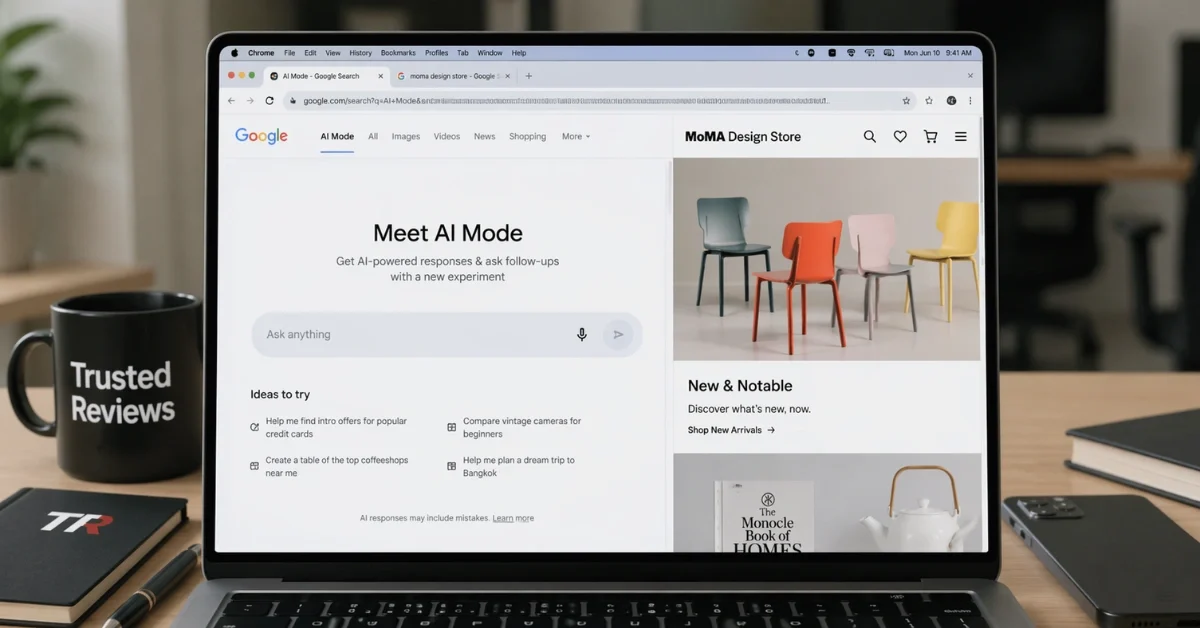
Google has introduced a new Chrome experience for AI Mode that lets users open webpages next to the AI interface instead of replacing the search view, a change the company says is meant to make browsing more fluid and context-aware while cutting down on tab switching. The update is designed to help people explore websites, compare details, and keep asking follow-up questions without losing the context of the original search.
The changes also expand how AI Mode handles search context inside Chrome. Google says users can now bring recent tabs, images, and files into a query through a new plus menu, allowing the system to answer questions with more context from the materials they are already using. The company is rolling out these features in the United States first and says it plans to bring them to additional regions later.
How the split view works
The most visible part of the update is the new side-by-side layout for AI Mode in Chrome. When someone clicks a result while using AI Mode, the webpage can stay open alongside the AI panel, so both the site and the conversation remain visible at the same time. That means a user can keep reading an article or browsing a shopping page while continuing to ask questions in the same window.
Google has framed that layout as a way to reduce the stop-and-start feeling that often comes with heavy browsing sessions. Instead of jumping back to search results, opening a new tab, and then returning to the chatbot, users can keep the research flow going in one view. Google said early testers found the setup helpful for maintaining focus, especially when working through long articles or videos.
Product research and follow-ups
Google’s example for the new layout centers on product research, where users often compare several options and need extra detail before making a choice. In one scenario, a shopper looking for a coffee maker can ask AI Mode for options, open a retailer’s page in split view, and then ask more specific questions, such as how easy the machine is to clean or how it performs. Google says AI Mode can answer by using both the content on the open page and broader information from across the web.
That approach is meant to keep the conversation tied to what the user is viewing in real time. As a result, AI Mode is positioned less like a separate search tool and more like an assistant that stays present while a person reads, compares, and evaluates information on the page in front of them.
Search across tabs and files
Google is also broadening AI Mode beyond a single page by letting people add more materials to a search. Through the new plus menu, users can select recent tabs and combine them with images or files so AI Mode can respond with a fuller understanding of the task at hand. The company says this can make searches more contextual because the response can reflect several sources at once rather than just one prompt in isolation.
Google has pointed to a few ways that might work in practice. Someone researching travel options could pull in multiple open tabs and ask for recommendations based on those pages, while a student could combine class materials and web content for more tailored explanations or examples during study sessions. The broader goal, according to Google’s description of the update, is to make Chrome better at supporting continuous browsing and research without forcing people to constantly manage a growing stack of tabs.
Wider rollout
For now, Google says the updated AI Mode experience is rolling out in the U.S. The company has also said the features are expected to expand to more regions over time. With side-by-side browsing and the ability to search across tabs, images, and files, the latest Chrome update pushes AI Mode further into everyday browsing tasks, especially for people comparing products, reading long pages, or working across several sources at once.
