

Google is expanding Chrome’s AI features with two connected updates aimed at making web research and routine tasks easier. The company has introduced new AI Mode features for side-by-side browsing, tab-based search, and multi-input queries, while also rolling out Skills, a Gemini-powered tool that lets users save and reuse prompts inside Chrome.
Together, the updates are designed to cut down on tab switching and help people keep their place while browsing. Google says the latest changes let users bring more context into a search, compare information more easily, and turn repeated AI prompts into one-click actions.
AI Mode moves closer to the page
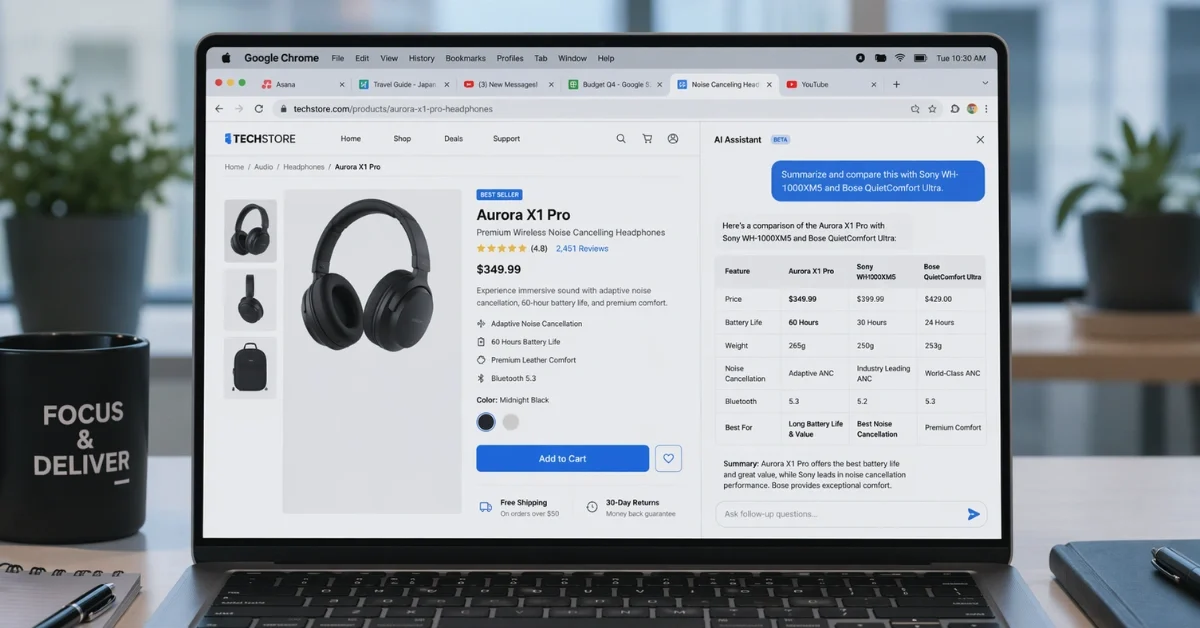
One of the biggest changes is a new side-by-side experience for AI Mode on Chrome desktop. When users click a link in AI Mode, the webpage can now open next to the AI interface instead of replacing it. That means people can keep reading a page, compare details, and ask follow-up questions without losing the context of the original search.
Google says this setup can be useful for both shopping and research. For example, someone looking for a coffee maker can describe what they want in AI Mode, open a retailer’s page beside the search interface, and then ask more specific questions, such as how easy the product is to clean or how it performs. The system can respond using information from the page that is open, along with information from across the web.
The company says early testers found this layout helpful when working through long articles and videos. The idea is to let people keep moving through content without constantly bouncing between tabs or restarting their train of thought.
Search can now pull from tabs, files, and images
Google is also expanding how much context users can feed into AI Mode. On Chrome desktop and mobile, users can tap the plus menu from the New Tab page or within AI Mode to add recent tabs into a search. The update also supports combining tabs with other inputs, including images and files such as PDFs.
That change opens up more tailored searches. Someone researching hiking trails, travel options, or a school topic can pull together multiple open tabs and ask a more focused question based on all of them at once. Google has also pointed to study-related use cases, where students can combine lecture notes, slides, PDFs, and webpages to get clearer explanations or examples tied to what they are already reading.
Chrome is also extending access to AI Mode tools in more places inside the browser. According to reports on the update, features such as Canvas and image generation are now available anywhere the new plus menu appears, making those tools easier to reach during normal browsing.
Skills turns repeated prompts into shortcuts
In a separate Chrome update, Google is rolling out Skills, a feature tied to Gemini in Chrome that saves frequently used prompts as reusable tools. Instead of typing the same request again and again, users can save a prompt from chat history and run it later with a single action.
Skills can be launched through the forward slash key or the plus button in the Gemini sidebar. Once triggered, a saved prompt can work on the page the user is viewing, and it can also pull information from other open tabs to combine details in one response. That makes it useful for tasks like comparing products, summarizing documents, extracting key information, or modifying recipes.
Google is also offering a library of ready-made Skills for people who do not want to build their own from scratch. Reports say these preset prompts include tasks such as breaking down product ingredients or helping find a gift based on budget and interests. Users can also edit those prompts to better match their needs.
The company says Skills uses the same security approach as the rest of Chrome. It will ask for approval before taking certain actions, including sending an email or adding an event to a calendar.
Availability and rollout
The newer AI Mode browsing features are currently rolling out in the United States, and Google has said it plans to bring them to more regions over time. The side-by-side browsing experience is aimed at Chrome desktop, while tab-based search additions are available across desktop and mobile.
Skills have a narrower launch to start. Google says it is rolling out to Chrome desktop users who are signed in to a Google account, and it initially works only when the browser language is set to English (US). Saved Skills can appear across signed-in desktop devices, giving users access to the same shortcuts wherever they use Chrome on desktop.
For Google, both updates point in the same direction. Chrome is becoming less of a simple browser window and more of a workspace where search, browsing, and Gemini tools stay connected while users move from one task to the next.
